Six decisions · one command · Opus 5

WORK FROM HOME WITH THIS SKILL

Agencies bill five figures for sites like this one. You are about to build one with six prompts and a single product photo. Paste them in order and watch the site improve live.

scroll to begin
What we cover today

Six prompts. One product photo. A finished site.

Each section below is one decision, one rule set, and one prompt. Paste them into Claude Code in order. The first prompt creates a bare page. Every prompt after it upgrades that same page: motion, then color, then words, then footage. By prompt six you have a working site you can show anyone.

01 · The core messaging

One line carries everything.

Premium sites say one thing. Four questions turn your product into a single thesis line, and that line gets tested against every decision that follows. This prompt ends with a real page on screen: your brand name and that line, plain type. Version one of the site you will keep upgrading.

One product photo is the only asset you need to start.
Four questions, no more. Over-asking is how projects stall.
Every prompt after this one upgrades the same index.html.
Prompt 01 · starts the site
Here is my product. [attach one product photo]

Interview me with exactly four questions, one at a time:
1. What is the product or brand, in one line?
2. Who is it for, and what should they feel?
3. What is the one thing they should remember?
4. Do I have an AI render tool connected for footage, or should we use stock video and images?

Then distill my answers into one thesis line the whole site will serve. Short. Specific. No filler.

Create version one of the site: a single index.html with the brand name, the thesis line, and a two-sentence lede. Plain readable type, no styling yet. Put my product photo in an assets/ folder. Serve it locally and give me the URL. We will upgrade this same file five more times, so keep it clean.
02 · The scroll style

What does scrolling mean here?

Scroll is a camera you hand to the visitor. A watch worth taking apart explodes. A workshop pans sideways. A process unfolds as a story. The style is matched to the product, never picked because it looks cool. This is the design decision most people never realize exists.

Seven styles cover almost every product on earth.
State the pick and defend it in one line.
If no motion adds meaning, an ambient loop is the honest choice.
Prompt 02 · adds the motion
Look at the product and thesis in index.html. Pick ONE scroll style and defend the choice in a single line:

A · Ambient loop: a hero object that just looks beautiful
B · Scroll-scrub: the product transforms or rotates as you scroll
C · Cursor-spotlight: revealed out of the dark by the cursor
D · Horizontal pan-lock: a place or lineup you move sideways through
E · Exploded view: a built object worth taking apart
F · Push-through: a space the camera flies into
G · Scrollytelling: a process worth watching unfold

Ask: what does scrolling MEAN for this product? Match the motion to the thing, not to taste.

Then upgrade index.html: add smooth inertia scrolling (Lenis) and scroll-triggered reveals (GSAP ScrollTrigger), and lay out the full page top to bottom: hero, thesis, two feature blocks, a gallery band, three detail rows, a CTA. Use clearly labeled placeholder blocks where the two videos and three images will go. Same file. Tell me to refresh.
03 · The color palette

A scene picks the colors, not the category.

"Software brand" forces nothing. "The last hour before the house wakes up" forces a nocturnal palette. You write one sentence about who is using the product, where, and in what light, and the palette falls out of it. This page came from: a woman building her own software after the house goes quiet.

bg
navy
purple
lavender
orange
Prompt 03 · adds color and type
Write one sentence: who is using this product, where, and in what light. Choose dark or light from that scene.

Then build the palette from the scene, never the category:
- Tint every neutral toward the brand hue. No flat grays.
- Commit to ONE saturated accent. Everything else stays quiet.
- The accent leads exactly once, on the thing you want clicked.
- Reduce saturation as a color approaches pure black or pure white, or it turns garish.

Apply the four tokens (bg, ink, muted, accent) to index.html, and add the fonts: one display face for headlines, one clean body face. Then show me the scene sentence next to the live page so I can judge whether the colors tell that story.
04 · The copy

Every word earns its place.

Expensive sites are quiet. Headlines stay short. Captions run three to five words with one accented word. Claims get specific: "live in 20 minutes" beats "fast and easy" every single time. And the spec-sheet clutter that screams template gets killed on sight.

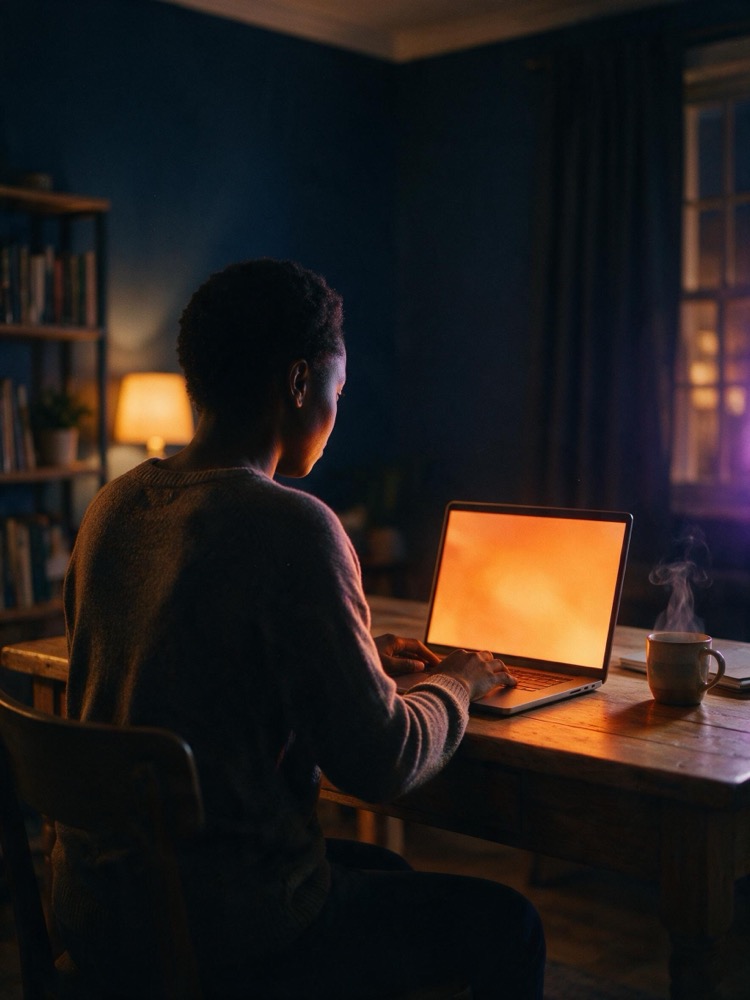
A home office desk at night, laptop open, warm lamp light against navy walls
g1 · the context shot
Prompt 04 · writes the words
Write the full site copy and put it straight into index.html, replacing every placeholder line:

- Headlines short. Captions 3 to 5 words, one accent word each.
- Specific beats generic: "live in 20 minutes" beats "fast and easy."
- Kill spec-sheet clutter. No feature lists, no jargon.
- No restated headings, no intro that repeats the title.
- No em dashes. Anywhere. Ever.
- Every claim concrete enough to be falsifiable.

The page needs: one eyebrow line, one lede, one thesis line, three captions, two feature blocks (heading + 2 sentences), three numbered detail rows, and one CTA line. Nothing else. Tell me to refresh and read it on the page, not in chat.
05 · Photo and video

Direct the camera like the user controls time.

The whole site runs on five assets: two videos and three images, each used exactly once. Scarcity reads as confidence. The two videos are siblings, same light and palette, different shot. And because scroll lets the visitor scrub time, the render laws are strict: locked camera, constant velocity, motion blur off.

video two · the sibling shot
Prompt 05 · renders the assets
Write 5 render prompts for my product: 2 videos + 3 vertical images. Each asset appears on the site exactly once.

Video laws:
- Lock the camera to the scroll axis. No drift, no zoom.
- Constant velocity. Motion blur OFF: the user controls time.
- The two videos are siblings: copy the hero prompt's lighting and material language, change only the motion or framing.
- For a transform: the START object must equal the END object, or fall back to a loop. Consistency over spectacle.

Example hero render:
"A woman's hands typing steadily on a laptop keyboard in a warm home office at night, one warm lamp off to the left, deep navy shadows behind her, a molten orange screen glow across her knuckles, shallow depth of field, real skin texture, 16:9. Motion: she types at an even rhythm, locked camera, constant speed, no zoom, no motion blur."

Images: one context shot, one extreme macro, one hero still. All vertical. Same rule as the videos: reuse the hero's lighting and material language so all five assets read as one shoot.

Example hero still:
"A woman seated at a wooden desk in a warm home office at night, seen from behind, hands resting on a glowing laptop, deep navy walls and shadows, one warm lamp off to the left, a molten orange screen glow washing across the desk, shallow depth of field, natural film grain, vertical."

Now GENERATE all five with my connected image and video tool. If I have no render tool, find five matching stock assets instead. Save them as assets/hero.mp4, assets/middle.mp4, assets/g1.jpg, assets/g2.jpg, assets/g3.jpg and wire each one into its placeholder in index.html. Tell me to refresh.
A woman at her desk at night, seen from behind, working on a glowing laptop
g3 · the hero still

Five prompts in, you have a site you could invoice for.

06 · The spine and the brand

Eight sections, one order.

Structure is a solved problem. Every premium site here runs the same spine, in the same order, and only the content changes. That is the brand identity secret: consistency in the skeleton frees every ounce of effort for the parts a visitor actually feels.

1Herovideo one, dark halo for legibility, alive on load
2Thesisone large line on the drifting mesh
3Featurestwo text and image pairs (g1, g2)
4Gallery bandimage, video two, image
5Second momentthe second scroll stop
6Rowsthree numbered editorial details
7Reserveone CTA, nothing competing with it
8Footeranimated aurora, the signature
Prompt 06 · ships the site
Final pass. Rebuild index.html into this exact section order: Hero (hero.mp4 full-bleed), Thesis line, two Feature pairs (g1 and g2), Gallery band (image, middle.mp4, image), three numbered Rows, the CTA, an animated footer.

Hard rules:
- 2 videos + 3 images, each used exactly once. No card grids, no gallery walls, no reused frames as filler.
- One committed accent, used once where it counts. Never flat #000 or #fff.
- Hero text sits on a soft dark halo so it never washes out.
- The hero must be moving before the first scroll.
- Final gate: if someone could look at it and say "AI made that," it failed. Gradient text, glassmorphism, identical cards, the big-number hero metric: all banned.

Serve the finished site, give me the URL, and list what changed in this pass. This is the site we ship.
Extreme macro of fingertips on a backlit laptop keyboard
g2 · the macro: proof the product works
Free download

Get more skills like this for free.

The six prompts get you 90% of the way. Sassy Skills is the full system, free inside The Claude Cohort. Download it, drop in one image, and let it run.

Download Sassy Skills

Free. Nothing breaks that we cannot undo.